
How to Install Nginx on AlmaLinux 9 (With SELinux & Permission Best Practices)
Overview
This guide covers installing Nginx on AlmaLinux 9 along with proper SELinux configuration and Linux permission management.
Instead of disabling security features, this article shows the correct, production-safe way to run Nginx without permission or access issues.
Nginx is commonly used for:
- Hosting static and dynamic websites
- Reverse proxy for applications
- Load balancing
- API gateways
Prerequisites
- Server running AlmaLinux 9
- Root or sudo access
- Active internet connection
Step 1: Update the System
sudo dnf update -y
Keeping the system updated avoids dependency and security issues.
Step 2: Install Nginx
sudo dnf install nginx -y
This installs:
- Nginx binaries
- Default configuration files
- systemd service unit
Step 3: Start and Enable Nginx
sudo systemctl start nginx sudo systemctl enable nginx
Verify:
sudo systemctl status nginx
Expected state: active (running)
Step 4: Configure Firewall (HTTP/HTTPS)
sudo firewall-cmd --permanent --add-service=http sudo firewall-cmd --permanent --add-service=https sudo firewall-cmd --reload
Step 5: Verify Nginx in Browser
Visit:
http://<server-ip>
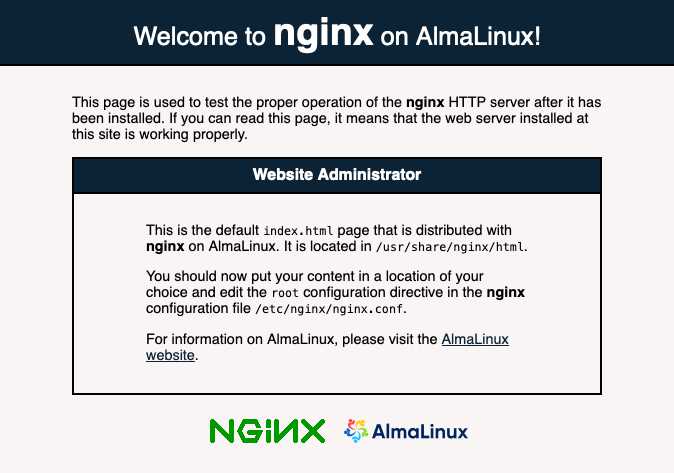
You should see the default welcome page of Nginx.
Important File Locations
| Purpose | Path |
|---|---|
| Main config | /etc/nginx/nginx.conf |
| Virtual hosts | /etc/nginx/conf.d/ |
| Web root | /usr/share/nginx/html |
| Logs | /var/log/nginx/ |
SELinux Best Practices for Nginx on AlmaLinux 9
SELinux is enabled by default on AlmaLinux 9 and should never be disabled in production.
Most Nginx issues (
403,
permission denied,
502) are caused by incorrect SELinux contexts, not Nginx itself.
Check SELinux Status
getenforce
Expected:
Enforcing
Allow Nginx to Serve Content From Custom Directories
Problem
You moved your website to:
/data/www/site1
But Nginx returns 403 Forbidden.
Reason
SELinux does not recognize the directory as web content.
Fix
sudo semanage fcontext -a -t httpd_sys_content_t "/data/www(/.*)?" sudo restorecon -Rv /data/www
What This Does
httpd_sys_content_t
allows read-only access- Secure and recommended for static content
Allow Nginx to Write Files (Uploads, Cache)
Use Case
- File uploads
- Cache directories
- Temporary files
Fix
sudo semanage fcontext -a -t httpd_sys_rw_content_t "/data/uploads(/.*)?" sudo restorecon -Rv /data/uploads
⚠️ Apply write permissions only where required, never globally.
Allow Nginx Reverse Proxy Connections
Problem
Nginx reverse proxy returns:
502 Bad Gateway
- Connection timeout
Fix
sudo setsebool -P httpd_can_network_connect on
Why?
This allows Nginx to initiate outbound connections to backend services.
Allow Nginx to Listen on Custom Ports
Example
Listening on port
8080or
8443
sudo semanage port -a -t http_port_t -p tcp 8080
Verify:
semanage port -l | grep http
Debug SELinux Issues (Critical Skill)
Check recent denials:
sudo ausearch -m AVC -ts recent
Human-readable explanation:
sudo sealert -a /var/log/audit/audit.log
Linux File Permission Best Practices for Nginx
SELinux controls policy, Linux permissions control ownership and access.
Both must be correct.
Recommended Ownership
sudo chown -R nginx:nginx /usr/share/nginx/html
Why?
- Nginx runs as
nginx
user - Prevents access conflicts
- Improves isolation
Recommended Permissions
Static Content
sudo find /usr/share/nginx/html -type d -exec chmod 755 {} \; sudo find /usr/share/nginx/html -type f -exec chmod 644 {} \;
| Item | Permission | Reason |
|---|---|---|
| Directories | 755 | Traversal allowed |
| Files | 644 | Read-only |
Upload Directories
sudo chown nginx:nginx /data/uploads sudo chmod 750 /data/uploads
Never use
777.
Logs Directory
sudo chown -R nginx:nginx /var/log/nginx sudo chmod 750 /var/log/nginx
Common Mistakes to Avoid
❌ Disabling SELinux
❌
chmod -R 777
❌ Running Nginx as root
❌ Guessing permissions without logs
Useful External Resources (Outbound Links)
- Official Nginx Docs: https://nginx.org/en/docs/
- Nginx Beginner Guide: https://nginx.org/en/docs/beginners_guide.html
- SELinux & Apache/Nginx Guide: https://access.redhat.com/documentation/en-us/red_hat_enterprise_linux/9
- AlmaLinux Wiki: https://wiki.almalinux.org/